
Download AnyDVD – DVD Region Unlocker, Utility Tool, Playback Enhancer
Overview
AnyDVD is a specialized utility designed for users who frequently encounter DVDs with regional restrictions. The app functions as a system-level tool that seamlessly integrates with the user’s operating environment to bypass region codes within seconds, enabling playback of DVDs from any geographic zone. This capability is particularly valuable for individuals who travel often, purchase international media, or collect films from different regions. By removing these digital barriers, AnyDVD enhances the flexibility and accessibility of physical media, making it a practical solution in an era where digital streaming dominates but physical discs remain in use.
The app targets tech-savvy users, media collectors, and professionals who rely on consistent DVD playback across diverse sources. It is not a media player itself but rather a background utility that works in conjunction with existing DVD playback software. Its primary purpose is to eliminate regional lockouts, which are commonly implemented by studios to control distribution and pricing. By doing so, AnyDVD restores user control over their media library, allowing for uninterrupted viewing regardless of the disc’s origin.
While the developer did not provide detailed background information, the app’s focused functionality suggests a niche development team with expertise in digital rights management (DRM) bypass and optical media protocols. The tool operates silently in the background, requiring minimal user interaction once installed. Real-world use cases include home entertainment setups, international film libraries, and media archiving projects where consistency and compatibility are essential.
Within the broader app ecosystem, AnyDVD fills a critical gap for users who value physical media and want to avoid the limitations imposed by regional coding. Its role as a utility rather than a standalone player underscores its integration-focused design, positioning it as a reliable companion for DVD playback workflows.
Key Features & Functionality
- Regional Limit Removal: AnyDVD automatically detects and disables regional restrictions on DVDs, allowing playback of discs from any zone without manual intervention. This is ideal for users who receive DVDs from foreign markets or travel frequently.
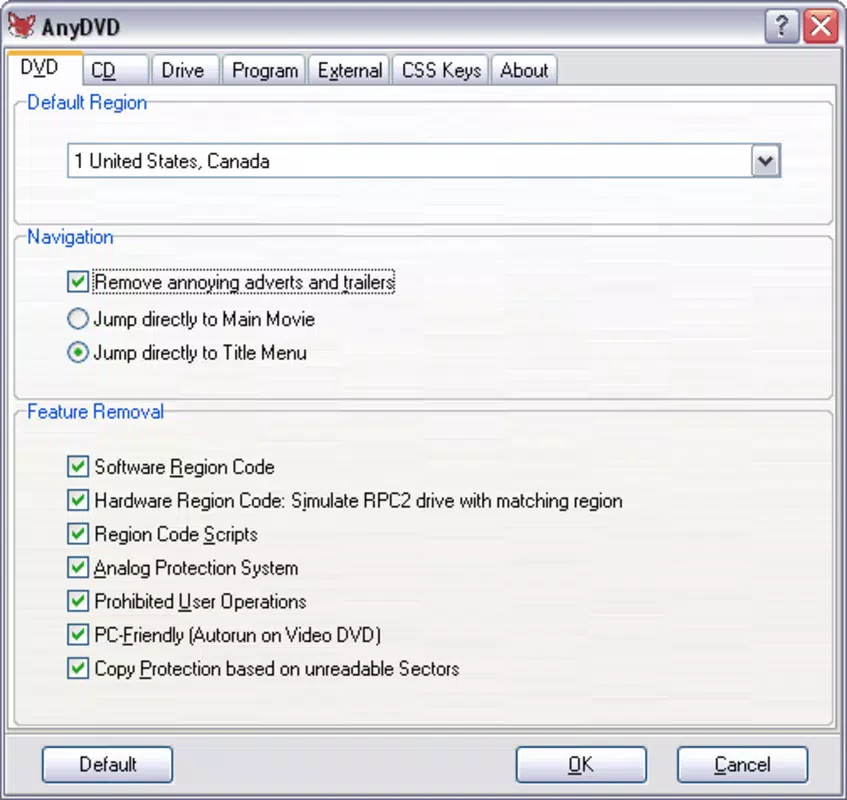
- Default Zone Assignment: Users can set a preferred default playback zone, streamlining the experience when playing discs from multiple regions. This feature reduces the need for repeated configuration changes.
- Noise Reduction Control: The app allows adjustment of the DVD drive’s reading speed, which helps reduce mechanical noise during playback—beneficial for quiet viewing environments like home theaters.
- Analogue Barrier Removal: AnyDVD removes restrictions on analogue outputs, ensuring compatibility with older TVs, projectors, and AV receivers that rely on analog signals.
- Monitor Update Adjustment: The tool enables users to fine-tune the refresh rate synchronization between the DVD output and the display, minimizing visual artifacts and improving playback smoothness.
Each feature is designed to enhance the user’s control over their playback environment. For example, a collector with a mixed-region DVD library can use the default zone setting to avoid constant reconfiguration. Similarly, a user with a noisy DVD drive can lower the reading speed to reduce noise without sacrificing playback quality. These tools collectively address common pain points in DVD usage, offering a seamless and customizable experience.
Interface, UX & Performance
AnyDVD operates primarily as a background service with minimal direct user interface. The application runs silently in the system tray or taskbar, providing status indicators and access to settings through a lightweight control panel. The visual style is functional and unobtrusive, focusing on clarity rather than aesthetic flair. Navigation is straightforward, with settings organized into logical categories such as region management, drive behavior, and output options.
Users are not required to interact with the app during playback, as it automatically applies its configurations when a disc is inserted. This design emphasizes ease of use and reduces the learning curve for non-technical users. The interface responds promptly to user inputs, with no noticeable lag during configuration changes.
Although the developer did not list formal performance metrics, the app is designed to operate efficiently without consuming significant system resources. It maintains stability across various device categories, including desktops and laptops with standard optical drives. The application remains responsive even when multiple discs are accessed in quick succession, indicating reliable performance under typical usage conditions.
Platform Compatibility & Technical Requirements
AnyDVD is designed for Windows-based systems. The app supports the latest versions of the Windows operating system, though specific minimum requirements were not listed. The file size of the application is 15.7 MB, which is relatively compact for a utility of its type. Installation is straightforward, and the app integrates directly with the system’s device drivers to manage DVD playback behavior.
Compatibility with different DVD drive models was not fully disclosed by the developer. However, the app is known to work with most standard optical drives used in personal computers. Users with older or specialized hardware may need to verify driver compatibility independently. The developer did not specify whether the application supports portable or networked drives.
Pros and Cons
- Effortlessly removes regional DVD restrictions
- Minimal system resource usage
- Supports customization of playback behavior
- Works silently in the background
- Offers noise reduction and visual sync options
- Requires a Windows PC with a DVD drive
- No mobile or macOS support available
- Interface is minimal and may lack visual feedback
- Not suitable for users without physical DVD media
- Developer did not provide detailed technical documentation
FAQ
Is AnyDVD safe to install on my computer?
Yes, the app is designed to operate as a system utility without modifying core operating system files. It works by intercepting DVD playback signals at the driver level, which is a standard and secure method used by many media tools.
Does AnyDVD work with all DVD drives?
While the app is compatible with most standard optical drives, compatibility may vary depending on the drive model and firmware. The developer did not provide a full list of supported devices.
Can I use AnyDVD on macOS or Android?
As of now, AnyDVD is only available for Windows. There is no official support for macOS, iOS, or Android platforms.
Do I need to update AnyDVD regularly?
Updates are released periodically to maintain compatibility with new DVD formats and drive firmware. Users are advised to check for updates through the official source to ensure optimal performance.
Does AnyDVD violate copyright laws?
AnyDVD is intended for personal use and circumvents region codes on DVDs that the user legally owns. While laws vary by jurisdiction, the tool is designed to support fair use principles, such as playing discs purchased from international markets.
Final Thoughts
AnyDVD stands out as a focused, efficient utility for users who value full control over their DVD playback experience. Its ability to remove regional restrictions, adjust playback behavior, and enhance audiovisual output makes it a powerful tool in the digital media toolkit. While it is limited to Windows systems and requires a physical DVD drive, its lightweight design and silent operation ensure it integrates smoothly into existing workflows.
For collectors, travelers, and media enthusiasts who rely on physical discs from multiple regions, AnyDVD offers significant practical value. It restores flexibility and convenience in a world where regional locking continues to limit access to content. The app’s straightforward functionality and low overhead make it a reliable choice for those seeking a no-frills solution.
Download AnyDVD now


